The Ralph Playbook
A comprehensive guide to running autonomous AI coding loops.
Ralph is an autonomous coding methodology that runs Claude in a continuous loop, using file-based state to maintain context across iterations. Each loop: read plan → pick task → implement → test → commit → clear context → repeat.
Why it works: Fresh context each iteration keeps the AI in its "smart zone." File-based memory (specs, plan, agents file) persists learnings. Backpressure (utilities, tests, builds) forces self-correction.
Key files: PROMPT.md (instructions)
+ AGENTS.md (operational guide) +
IMPLEMENTATION_PLAN.md (task list) +
specs/* (requirements)
December 2025 boiled Ralph's powerful yet dumb little face to the top of most AI-related timelines.
I try to pay attention to the crazy-smart insights @GeoffreyHuntley shares, but I can't say Ralph really clicked for me this summer. Now, all of the recent hubbub has made it hard to ignore.
@mattpocockuk and @ryancarson's overviews helped a lot - right until Geoff came in and said 'nah'.

So what is the optimal way to Ralph?
Many folks seem to be getting good results with various shapes - but I wanted to read the tea leaves as closely as possible from the person who not only captured this approach but also has had the most ass-time in the seat putting it through its paces.
So I dug in to really RTFM on recent videos and Geoff's original post to try and untangle for myself what works best.
Below is the result - a (likely OCD-fueled) Ralph Playbook that organizes the miscellaneous details for putting this all into practice w/o hopefully neutering it in the process.
Digging into all of this has also brought to mind some possibly valuable additional enhancements to the core approach that aim to stay aligned with the guidelines that make Ralph work so well.
Hope this helps you out - @ClaytonFarr
Workflow
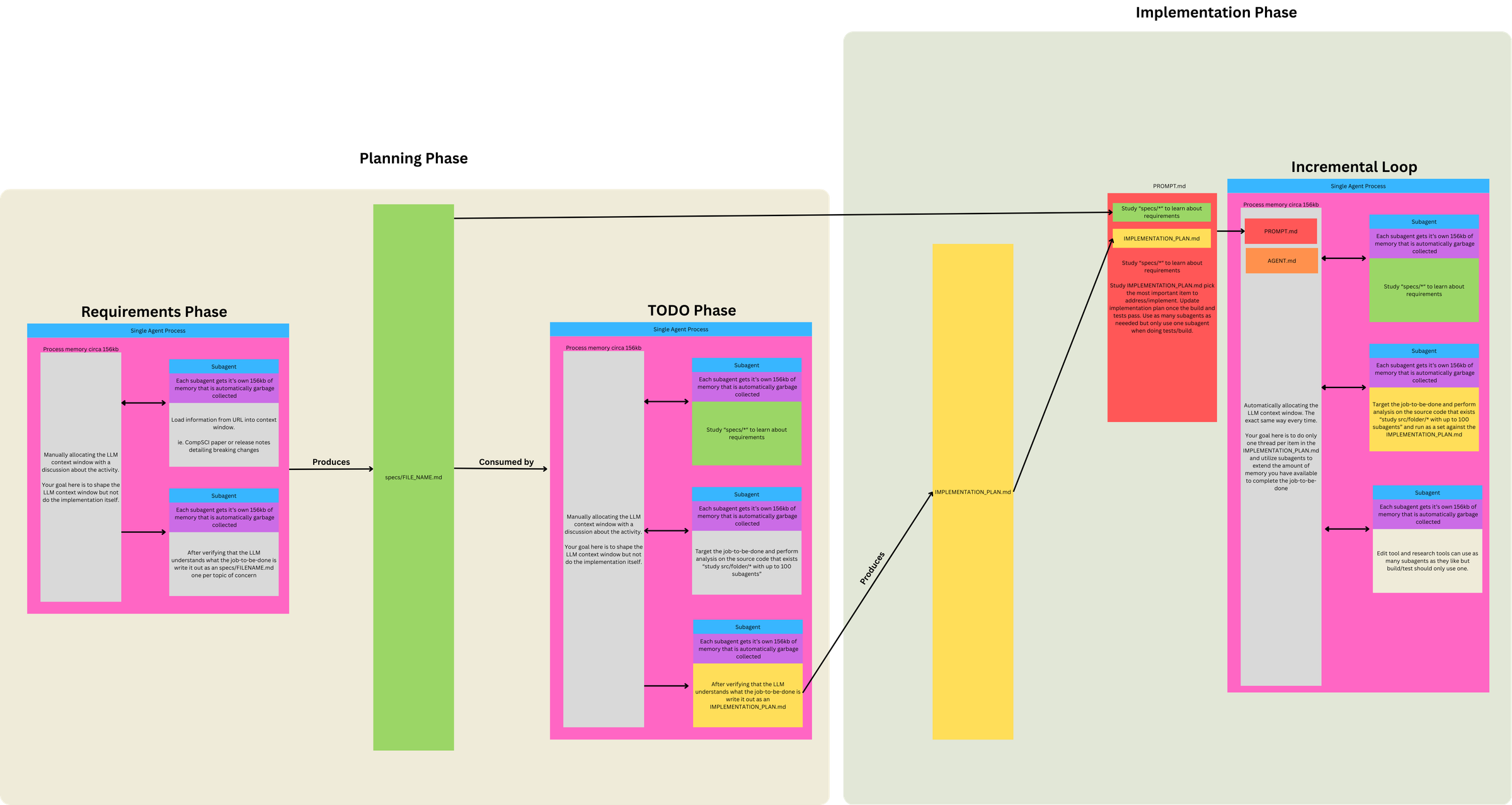
A picture is worth a thousand tweets and an hour-long video. Geoff's overview here (sign up to his newsletter to see full article) really helped clarify the workflow details for moving from 1) idea → 2) individual JTBD-aligned specs → 3) comprehensive implementation plan → 4) Ralph work loops.
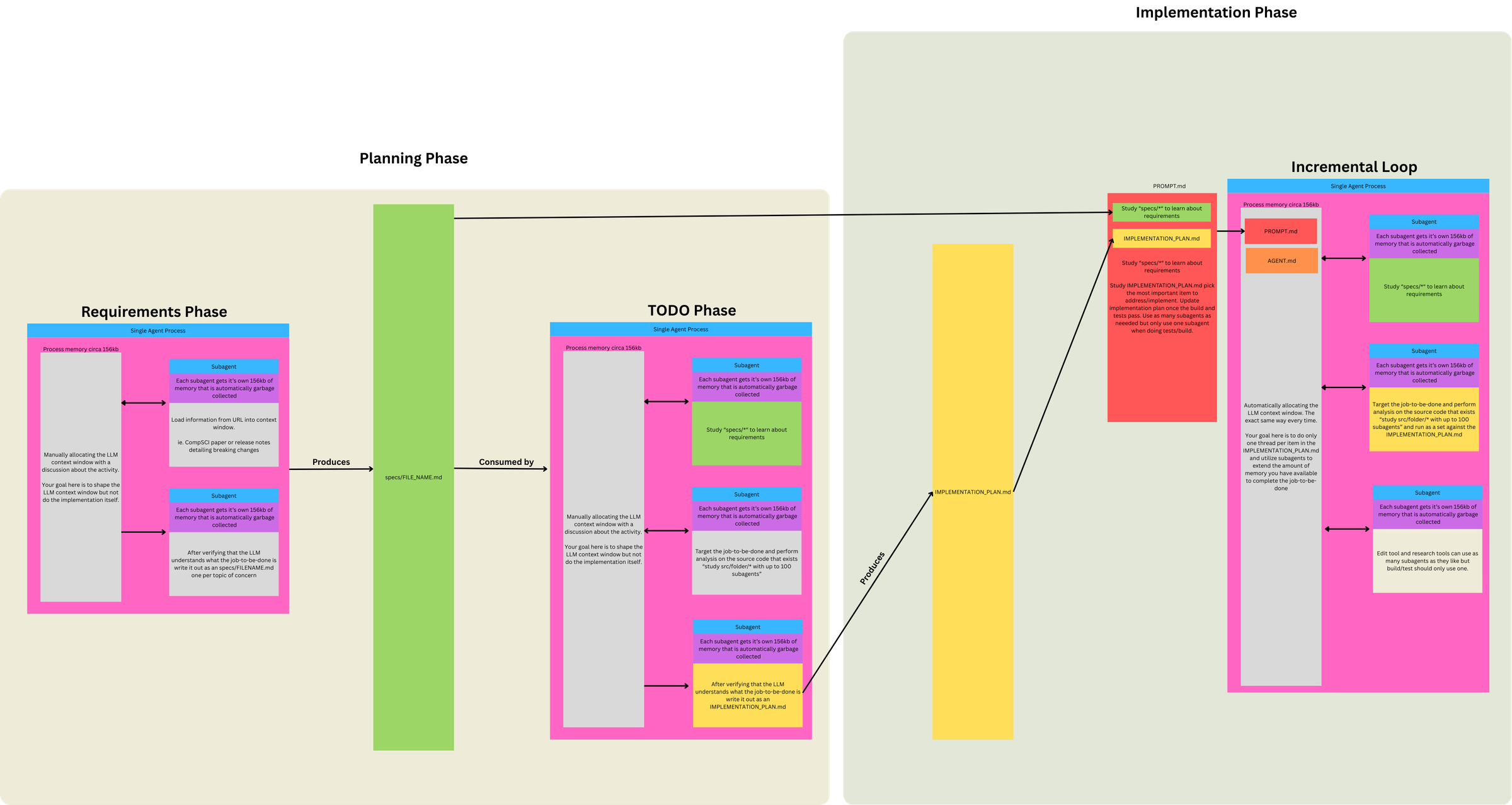
Three Phases, Two Prompts, One Loop
This diagram clarified for me that Ralph isn't just "a loop that codes." It's a funnel with 3 Phases, 2 Prompts, and 1 Loop.
Phase 1. Define Requirements (LLM conversation)
- Discuss project ideas → identify Jobs to Be Done (JTBD)
- Break individual JTBD into topic(s) of concern
- Use subagents to load info from URLs into context
-
LLM understands JTBD topic of concern: subagent writes
specs/FILENAME.mdfor each topic
Phase 2 / 3. Run Ralph Loop (two modes, swap PROMPT.md as needed)
Same loop mechanism, different prompts for different objectives:
| Mode | When to use | Prompt focus |
|---|---|---|
| PLANNING | No plan exists, or plan is stale/wrong |
Generate/update IMPLEMENTATION_PLAN.md only
|
| BUILDING | Plan exists | Implement from plan, commit, update plan as side effect |
Prompt differences per mode:
- 'PLANNING' prompt does gap analysis (specs vs code) and outputs a prioritized TODO list—no implementation, no commits.
- 'BUILDING' prompt assumes plan exists, picks tasks from it, implements, runs tests (backpressure), commits.
Why use the loop for both modes?
- BUILDING requires it: inherently iterative (many tasks × fresh context = isolation)
- PLANNING uses it for consistency: same execution model, though often completes in 1-2 iterations
- Flexibility: if plan needs refinement, loop allows multiple passes reading its own output
- Simplicity: one mechanism for everything; clean file I/O; easy stop/restart
Context loaded each iteration:
PROMPT.md + AGENTS.md
Concepts
| Term | Definition |
|---|---|
| Job to be Done (JTBD) | High-level user need or outcome |
| Topic of Concern | A distinct aspect/component within a JTBD |
| Spec |
Requirements doc for one topic of concern
(specs/FILENAME.md)
|
| Task | Unit of work derived from comparing specs to code |
Relationships:
- 1 JTBD → multiple topics of concern
- 1 topic of concern → 1 spec
- 1 spec → multiple tasks (specs are larger than tasks)
"One Sentence Without 'And'" – Can you describe the topic of concern in one sentence without conjoining unrelated capabilities?
- ✓ "The color extraction system analyzes images to identify dominant colors"
- ✗ "The user system handles authentication, profiles, and billing" → 3 topics
If you need "and" to describe what it does, it's probably multiple topics.
Key Principles
Four principles drive Ralph's effectiveness: constrained context, backpressure, autonomous action, and human oversight over the loop - not in it.
Context Is Everything
- When 200K+ tokens advertised = ~176K truly usable
- And 40-60% context utilization for "smart zone"
- Tight tasks + 1 task per loop = 100% smart zone context utilization
This informs and drives everything else:
-
Use the main agent/context as a scheduler
- Don't allocate expensive work to main context; spawn subagents whenever possible instead
-
Use subagents as memory extension
- Each subagent gets ~156kb that's garbage collected
- Fan out to avoid polluting main context
-
Simplicity and brevity win
- Applies to number of parts in system, loop config, and content
- Verbose inputs degrade determinism
-
Prefer Markdown over JSON
- To define and track work, for better token efficiency
Steering Ralph: Patterns + Backpressure
Creating the right signals & gates to steer Ralph's successful output is critical. You can steer from two directions:
-
Steer upstream
- Ensure deterministic setup:
- Allocate first ~5,000 tokens for specs
-
Every loop's context is allocated with the same files so
model starts from known state (
PROMPT.md+AGENTS.md)
- Your existing code shapes what gets used and generated
- If Ralph is generating wrong patterns, add/update utilities and existing code patterns to steer it toward correct ones
- Ensure deterministic setup:
-
Steer downstream
- Create backpressure via tests, typechecks, lints, builds, etc. that will reject invalid/unacceptable work
-
Prompt says "run tests" generically.
AGENTS.mdspecifies actual commands to make backpressure project-specific - Backpressure can extend beyond code validation: some acceptance criteria resist programmatic checks - creative quality, aesthetics, UX feel. LLM-as-judge tests can provide backpressure for subjective criteria with binary pass/fail. (More detailed thoughts below on how to approach this with Ralph.)
-
Remind Ralph to create/use backpressure
- Remind Ralph to use backpressure when implementing: "Important: When authoring documentation, capture the why — tests and implementation importance."
Let Ralph Ralph
Ralph's effectiveness comes from how much you trust it do the right thing (eventually) and engender its ability to do so.
-
Let Ralph Ralph
- Lean into LLM's ability to self-identify, self-correct and self-improve
- Applies to implementation plan, task definition and prioritization
- Eventual consistency achieved through iteration
-
Use protection
-
To operate autonomously, Ralph requires
--dangerously-skip-permissions- asking for approval on every tool call would break the loop. This bypasses Claude's permission system entirely - so a sandbox becomes your only security boundary. - Philosophy: "It's not if it gets popped, it's when. And what is the blast radius?"
- Running without a sandbox exposes credentials, browser cookies, SSH keys, and access tokens on your machine
-
Run in isolated environments with minimum viable access:
- Only the API keys and deploy keys needed for the task
- No access to private data beyond requirements
- Restrict network connectivity where possible
- Options: Docker sandboxes (local), Fly Sprites/E2B/etc. (remote/production) - additional notes
-
Additional escape hatches: Ctrl+C stops the loop;
git reset --hardreverts uncommitted changes; regenerate plan if trajectory goes wrong
-
To operate autonomously, Ralph requires
Move Outside the Loop
To get the most out of Ralph, you need to get out of his way. Ralph should be doing all of the work, including decided which planned work to implement next and how to implement it. Your job is now to sit on the loop, not in it - to engineer the setup and environment that will allow Ralph to succeed.
Observe and course correct – especially early on, sit and watch. What patterns emerge? Where does Ralph go wrong? What signs does he need? The prompts you start with won't be the prompts you end with - they evolve through observed failure patterns.
Tune it like a guitar – instead of prescribing everything upfront, observe and adjust reactively. When Ralph fails a specific way, add a sign to help him next time.
But signs aren't just prompt text. They're anything Ralph can discover:
- Prompt guardrails - explicit instructions like "don't assume not implemented"
-
AGENTS.md- operational learnings about how to build/test - Utilities in your codebase - when you add a pattern, Ralph discovers it and follows it
- Other discoverable, relevant inputs…
-
try starting with nothing in
AGENTS.md(empty file; no best practices, etc.) - spot-test desired actions, find missteps (walkthrough example from Geoff)
- watch initial loops, see where gaps occur
- tune behavior only as needed, via AGENTS updates and/or code patterns (shared utilities, etc.)
And remember, the plan is disposable:
- If it's wrong, throw it out, and start over
- Regeneration cost is one Planning loop; cheap compared to Ralph going in circles
-
Regenerate when:
- Ralph is going off track (implementing wrong things, duplicating work)
- Plan feels stale or doesn't match current state
- Too much clutter from completed items
- You've made significant spec changes
- You're confused about what's actually done
Loop Mechanics
The mechanical details of how the outer bash loop and inner task execution work together.
I. Task Selection
loop.sh acts in effect as an 'outer loop' where each loop = a single task (in separate sessions). When the task is completed, loop.sh kicks off a fresh session to select the next task, if any remaining tasks are available.
Geoff's initial minimal form of loop.sh script:
while :; do cat PROMPT.md | claude ; done
Note: The same approach can be used with other CLIs; e.g.
amp, codex, opencode, etc.
What controls task continuation?
The continuation mechanism is elegantly simple:
-
Bash loop runs → feeds
PROMPT.mdto claude - PROMPT.md instructs → "Study IMPLEMENTATION_PLAN.md and choose the most important thing..."
- Agent completes one task → updates IMPLEMENTATION_PLAN.md on disk, commits, exits
- Bash loop restarts immediately → fresh context window
- Agent reads updated plan → picks next most important thing...
The IMPLEMENTATION_PLAN.md file persists on disk between
iterations and acts as shared state between otherwise isolated
loop executions. Each iteration deterministically loads the same
files (PROMPT.md + AGENTS.md +
specs/*) and reads the current state from disk.
No sophisticated orchestration needed - just a dumb bash loop that keeps restarting the agent, and the agent figures out what to do next by reading the plan file each time.
II. Task Execution
Each task is prompted to keep doing its work against backpressure (tests, etc) until it passes - creating a pseudo inner 'loop' (in single session).
This inner loop is just internal self-correction / iterative reasoning within one long model response, powered by backpressure prompts, tool use, and subagents. It's not a loop in the programming sense.
A single task execution has no hard technical limit. Control relies on:
- Scope discipline - PROMPT.md instructs "one task" and "commit when tests pass"
- Backpressure - tests/build failures force the agent to fix issues before committing
- Natural completion - agent exits after successful commit
Ralph can go in circles, ignore instructions, or take wrong directions - this is expected and part of the tuning process. When Ralph "tests you" by failing in specific ways, you add guardrails to the prompt or adjust backpressure mechanisms. The nondeterminism is manageable through observation and iteration.
Enhanced loop.sh Example
Wraps core loop with mode selection (plan/build), with max-iterations for max number of tasks to complete, and git push after each iteration.
This enhancement uses two saved prompt files:
-
PROMPT_plan.md- Planning mode (gap analysis, generates/updates plan) -
PROMPT_build.md- Building mode (implements from plan)
Enhanced `loop.sh` script
#!/bin/bash
# Usage: ./loop.sh [plan|build] [max_iterations]
# Examples:
#   ./loop.sh              # Build mode, unlimited tasks
#   ./loop.sh 20           # Build mode, max 20 tasks
#   ./loop.sh build 20     # Build mode, max 20 tasks
#   ./loop.sh plan         # Plan mode, unlimited tasks
#   ./loop.sh plan 5       # Plan mode, max 5 tasks

# Parse arguments
if [ "$1" = "plan" ]; then
    # Plan mode
    MODE="plan"
    PROMPT_FILE="PROMPT_plan.md"
    MAX_ITERATIONS=${2:-0}
elif [ "$1" = "build" ]; then
    # Explicit build mode
    MODE="build"
    PROMPT_FILE="PROMPT_build.md"
    MAX_ITERATIONS=${2:-0}
elif [[ "$1" =~ ^[0-9]+$ ]]; then
    # Build mode with max tasks (bare number)
    MODE="build"
    PROMPT_FILE="PROMPT_build.md"
    MAX_ITERATIONS=$1
else
    # Build mode, unlimited (no arguments or invalid input)
    MODE="build"
    PROMPT_FILE="PROMPT_build.md"
    MAX_ITERATIONS=0
fi

ITERATION=0
CURRENT_BRANCH=$(git branch --show-current)

echo "━━━━━━━━━━━━━━━━━━━━━━━━━━━━━━━━━━━━━━━━"
echo "Mode:   $MODE"
echo "Prompt: $PROMPT_FILE"
echo "Branch: $CURRENT_BRANCH"
[ $MAX_ITERATIONS -gt 0 ] && echo "Max:    $MAX_ITERATIONS iterations (number of tasks)"
echo "━━━━━━━━━━━━━━━━━━━━━━━━━━━━━━━━━━━━━━━━"

# Verify prompt file exists
if [ ! -f "$PROMPT_FILE" ]; then
    echo "Error: $PROMPT_FILE not found"
    exit 1
fi

while true; do
    if [ $MAX_ITERATIONS -gt 0 ] && [ $ITERATION -ge $MAX_ITERATIONS ]; then
        echo "Reached max iterations (number of tasks): $MAX_ITERATIONS"
        break
    fi

    # Run Ralph iteration with selected prompt
    # -p: Headless mode (non-interactive, reads from stdin)
    # --dangerously-skip-permissions: Auto-approve all tool calls (YOLO mode)
    # --output-format=stream-json: Structured output for logging/monitoring
    # --model opus: Primary agent uses Opus for complex reasoning (task selection, prioritization)
    #               Can use 'sonnet' in build mode for speed if plan is clear and tasks well-defined
    # --verbose: Detailed execution logging
    cat "$PROMPT_FILE" | claude -p \
        --dangerously-skip-permissions \
        --output-format=stream-json \
        --model opus \
        --verbose

    # Push changes after each iteration
    git push origin "$CURRENT_BRANCH" || {
        echo "Failed to push. Creating remote branch..."
        git push -u origin "$CURRENT_BRANCH"
    }

    ITERATION=$((ITERATION + 1))
    echo -e "\n\n======================== LOOP $ITERATION ========================\n"
done
Mode selection:
-
No keyword → Uses
PROMPT_build.mdfor building (implementation) -
plankeyword → UsesPROMPT_plan.mdfor planning (gap analysis, plan generation)
Max-iterations:
- Limits the task selection loop (number of tasks attempted; NOT tool calls within a single task)
- Each iteration = one fresh context window = one task from IMPLEMENTATION_PLAN.md = one commit
-
./loop.shruns unlimited (manual stop with Ctrl+C) -
./loop.sh 20runs max 20 iterations then stops
Claude CLI flags:
-
-p(headless mode): Enables non-interactive operation, reads prompt from stdin -
--dangerously-skip-permissions: Bypasses all permission prompts for fully automated runs -
--output-format=stream-json: Outputs structured JSON for logging/monitoring/visualization -
--model opus: Primary agent uses Opus for task selection, prioritization, and coordination (can usesonnetfor speed if tasks are clear) -
--verbose: Provides detailed execution logging
Streamed Output Variant
An alternative loop_streamed.sh that pipes Claude's
raw JSON output through parse_stream.js for readable,
color-coded terminal display showing tool calls, results, and
execution stats.
Differences from base loop.sh:
-
Passes prompt as argument (
-p "$FULL_PROMPT") instead of stdin pipe -
Adds
--include-partial-messagesfor real-time streaming -
Pipes output through
parse_stream.js(Node.js, no dependencies) - Appends "Execute the instructions above." to prompt content
Files:
loop_streamed.sh
·
parse_stream.js
— contributed by @terry-xyz · @blackrosesxyz
Files
The file structure and templates that make Ralph work.
project-root/
├── loop.sh                         # Ralph loop script
├── PROMPT_build.md                 # Build mode instructions
├── PROMPT_plan.md                  # Plan mode instructions
├── AGENTS.md                       # Operational guide loaded each iteration
├── IMPLEMENTATION_PLAN.md          # Prioritized task list (generated/updated by Ralph)
├── specs/                          # Requirement specs (one per JTBD topic)
│   ├── [jtbd-topic-a].md
│   └── [jtbd-topic-b].md
├── src/                            # Application source code
└── src/lib/ # Shared utilities & components| File | Purpose | Modified By |
|---|---|---|
loop.sh |
Task selection loop orchestration | You (setup) |
PROMPT_*.md |
Instructions per mode | You (tuning) |
AGENTS.md |
Operational guide | Ralph + You |
IMPLEMENTATION_PLAN.md |
Prioritized task list | Ralph |
specs/* |
Requirements per topic | You + Ralph |
loop.sh
The primary loop script that orchestrates Ralph iterations.
See Loop Mechanics section for detailed implementation examples and configuration options.
Setup: Make the script executable before first use:
chmod +x loop.shCore function: Continuously feeds prompt file to Claude, manages iteration limits, and pushes changes after each task completion.
PROMPTS
The instruction set for each loop iteration. Swap between PLANNING and BUILDING versions as needed.
Prompt Structure
| Section | Purpose |
|---|---|
| Phase 0 (0a, 0b, 0c) | Orient: study specs, source location, current plan |
| Phase 1-4 | Main instructions: task, validation, commit |
| 999... numbering | Guardrails/invariants (higher number = more critical) |
Key Language Patterns (Geoff's specific phrasing):
- "study" (not "read" or "look at")
- "don't assume not implemented" (critical - the Achilles' heel)
- "using parallel subagents" / "up to N subagents"
- "only 1 subagent for build/tests" (backpressure control)
- "Think extra hard" (now "Ultrathink")
- "capture the why"
- "keep it up to date"
- "if functionality is missing then it's your job to add it"
- "resolve them or document them"
PROMPT_*.md Templates
Notes:
- Update [project-specific goal] placeholder below.
- Current subagents names presume using Claude.
PROMPT_plan.md Template
0a. Study `specs/*` with up to 250 parallel Sonnet subagents to learn the application specifications.
0b. Study @IMPLEMENTATION_PLAN.md (if present) to understand the plan so far.
0c. Study `src/lib/*` with up to 250 parallel Sonnet subagents to understand shared utilities & components.
0d. For reference, the application source code is in `src/*`.

1. Study @IMPLEMENTATION_PLAN.md (if present; it may be incorrect) and use up to 500 Sonnet subagents to study existing source code in `src/*` and compare it against `specs/*`. Use an Opus subagent to analyze findings, prioritize tasks, and create/update @IMPLEMENTATION_PLAN.md as a bullet point list sorted in priority of items yet to be implemented. Ultrathink. Consider searching for TODO, minimal implementations, placeholders, skipped/flaky tests, and inconsistent patterns. Study @IMPLEMENTATION_PLAN.md to determine starting point for research and keep it up to date with items considered complete/incomplete using subagents.

IMPORTANT: Plan only. Do NOT implement anything. Do NOT assume functionality is missing; confirm with code search first. Treat `src/lib` as the project's standard library for shared utilities and components. Prefer consolidated, idiomatic implementations there over ad-hoc copies.

ULTIMATE GOAL: We want to achieve [project-specific goal]. Consider missing elements and plan accordingly. If an element is missing, search first to confirm it doesn't exist, then if needed author the specification at specs/FILENAME.md. If you create a new element then document the plan to implement it in @IMPLEMENTATION_PLAN.md using a subagent.
Note: Current subagents names presume using Claude.
PROMPT_build.md Template
0a. Study `specs/*` with up to 500 parallel Sonnet subagents to learn the application specifications.
0b. Study @IMPLEMENTATION_PLAN.md.
0c. For reference, the application source code is in `src/*`.

1. Your task is to implement functionality per the specifications using parallel subagents. Follow @IMPLEMENTATION_PLAN.md and choose the most important item to address. Before making changes, search the codebase (don't assume not implemented) using Sonnet subagents. You may use up to 500 parallel Sonnet subagents for searches/reads and only 1 Sonnet subagent for build/tests. Use Opus subagents when complex reasoning is needed (debugging, architectural decisions).
2. After implementing functionality or resolving problems, run the tests for that unit of code that was improved. If functionality is missing then it's your job to add it as per the application specifications. Ultrathink.
3. When you discover issues, immediately update @IMPLEMENTATION_PLAN.md with your findings using a subagent. When resolved, update and remove the item.
4. When the tests pass, update @IMPLEMENTATION_PLAN.md, then `git add -A` then `git commit` with a message describing the changes. After the commit, `git push`.

99999. Important: When authoring documentation, capture the why — tests and implementation importance.
999999. Important: Single sources of truth, no migrations/adapters. If tests unrelated to your work fail, resolve them as part of the increment.
9999999. As soon as there are no build or test errors create a git tag. If there are no git tags start at 0.0.0 and increment patch by 1 for example 0.0.1  if 0.0.0 does not exist.
99999999. You may add extra logging if required to debug issues.
999999999. Keep @IMPLEMENTATION_PLAN.md current with learnings using a subagent — future work depends on this to avoid duplicating efforts. Update especially after finishing your turn.
9999999999. When you learn something new about how to run the application, update @AGENTS.md using a subagent but keep it brief. For example if you run commands multiple times before learning the correct command then that file should be updated.
99999999999. For any bugs you notice, resolve them or document them in @IMPLEMENTATION_PLAN.md using a subagent even if it is unrelated to the current piece of work.
999999999999. Implement functionality completely. Placeholders and stubs waste efforts and time redoing the same work.
9999999999999. When @IMPLEMENTATION_PLAN.md becomes large periodically clean out the items that are completed from the file using a subagent.
99999999999999. If you find inconsistencies in the specs/* then use an Opus 4.6 subagent with 'ultrathink' requested to update the specs.
999999999999999. IMPORTANT: Keep @AGENTS.md operational only – status updates and progress notes belong in `IMPLEMENTATION_PLAN.md`. A bloated AGENTS.md pollutes every future loop's context.
AGENTS.md
Single, canonical "heart of the loop" - a concise, operational "how to run/build" guide.
- NOT a changelog or progress diary
- Describes how to build/run the project
- Captures operational learnings that improve the loop
- Keep brief (~60 lines)
Status, progress, and planning belong in
IMPLEMENTATION_PLAN.md, not here.
Loopback / Immediate Self-Evaluation
AGENTS.md should contain the project-specific commands that enable loopback - the ability for Ralph to immediately evaluate his work within the same loop. This includes:
- Build commands
- Test commands (targeted and full suite)
- Typecheck/lint commands
- Any other validation tools
The BUILDING prompt says "run tests" generically; AGENTS.md specifies the actual commands. This is how backpressure gets wired in per-project.
AGENTS.md Example Structure
## Build & Run

Succinct rules for how to BUILD the project:

## Validation

Run these after implementing to get immediate feedback:

- Tests: `[test command]`
- Typecheck: `[typecheck command]`
- Lint: `[lint command]`

## Operational Notes

Succinct learnings about how to RUN the project:

...

### Codebase Patterns

...
IMPLEMENTATION_PLAN.md
Prioritized bullet-point list of tasks derived from gap analysis (specs vs code) - generated by Ralph.
- Created via PLANNING mode
- Updated during BUILDING mode (mark complete, add discoveries, note bugs)
- Can be regenerated – Geoff: "I have deleted the TODO list multiple times" → switch to PLANNING mode
- Self-correcting – BUILDING mode can even create new specs if missing
The circularity is intentional: eventual consistency through iteration.
No pre-specified template - let Ralph/LLM dictate and manage format that works best for it.
specs/*
One markdown file per topic of concern. These are the source of truth for what should be built.
- Created during Requirements phase (human + LLM conversation)
- Consumed by both PLANNING and BUILDING modes
- Can be updated if inconsistencies discovered (rare, use subagent)
No pre-specified template - let Ralph/LLM dictate and manage format that works best for it.
src/ and src/lib/
Application source code and shared utilities/components.
Referenced in PROMPT.md templates for orientation
steps.
Enhancements?
Clayton: I'm still determining the value/viability of these, but the opportunities sound promising –
Use Claude's AskUserQuestionTool for Planning Use Claude's built-in interview tool to systematically clarify JTBD, edge cases, and acceptance criteria for specs.
During Phase 1 (Define Requirements), use Claude's built-in
AskUserQuestionTool to systematically explore
JTBD, topics of concern, edge cases, and acceptance criteria
through structured interview before writing specs.
When to use: Minimal/vague initial requirements, need to clarify constraints, or multiple valid approaches exist.
Invoke: "Interview me using AskUserQuestion to understand [JTBD/topic/acceptance criteria/...]"
Claude will ask targeted questions to clarify requirements and
ensure alignment before producing
specs/*.md files.
Flow:
- Start with known information →
- Claude interviews via AskUserQuestion →
- Iterate until clear →
- Claude writes specs with acceptance criteria →
- Proceed to planning/building
No code or prompt changes needed – this simply enhances Phase 1 using existing Claude Code capabilities.
Inspiration - Thariq's X post:
Acceptance-Driven Backpressure Derive test requirements during planning from acceptance criteria. Prevents "cheating" - can't claim done without appropriate tests passing.
Geoff's Ralph implicitly connects specs → implementation → tests through emergent iteration. This enhancement would make that connection explicit by deriving test requirements during planning, creating a direct line from "what success looks like" to "what verifies it."
This enhancement connects acceptance criteria (in specs) directly to test requirements (in implementation plan), improving backpressure quality by:
- Preventing "no cheating" - Can't claim done without required tests derived from acceptance criteria
- Enabling TDD workflow - Test requirements known before implementation starts
- Improving convergence - Clear completion signal (required tests pass) vs ambiguous ("seems done?")
- Maintaining determinism - Test requirements in plan (known state) not emergent (probabilistic)
Compatibility with Core Philosophy
| Principle | Maintained? | How |
|---|---|---|
| Monolithic operation | ✅ Yes | One agent, one task, one loop at a time |
| Backpressure critical | ✅ Yes | Tests are the mechanism, just derived explicitly now |
| Context efficiency | ✅ Yes | Planning decides tests once vs building rediscovering |
| Deterministic setup | ✅ Yes | Test requirements in plan (known state) not emergent |
| Let Ralph Ralph | ✅ Yes | Ralph still prioritizes and chooses implementation approach |
| Plan is disposable | ✅ Yes | Wrong test requirements? Regenerate plan |
| "Capture the why" | ✅ Yes | Test intent documented in plan before implementation |
| No cheating | ✅ Yes | Required tests prevent placeholder implementations |
The Prescriptiveness Balance
The critical distinction:
Acceptance criteria (in specs) = Behavioral outcomes, observable results, what success looks like
- ✅ "Extracts 5-10 dominant colors from any uploaded image"
- ✅ "Processes images <5MB in <100ms"
- ✅ "Handles edge cases: grayscale, single-color, transparent backgrounds"
Test requirements (in plan) = Verification points derived from acceptance criteria
- ✅ "Required tests: Extract 5-10 colors, Performance <100ms, Handle grayscale edge case"
Implementation approach (up to Ralph) = Technical decisions about how to achieve it
- ❌ "Use K-means clustering with 3 iterations and LAB color space conversion"
The key: Specify WHAT to verify (outcomes), not HOW to implement (approach)
This maintains "Let Ralph Ralph" principle - Ralph decides implementation details while having clear success signals.
Architecture: Three-Phase Connection
Phase 1: Requirements Definition
    specs/*.md + Acceptance Criteria
    ↓
Phase 2: Planning (derives test requirements)
    IMPLEMENTATION_PLAN.md + Required Tests
    ↓
Phase 3: Building (implements with tests)
    Implementation + Tests → Backpressure
Phase 1: Requirements Definition
During the human + LLM conversation that produces specs:
- Discuss JTBD and break into topics of concern
- Use subagents to load external context as needed
- Discuss and define acceptance criteria – what observable, verifiable outcomes indicate success
- Keep criteria behavioral (outcomes), not implementation (how to build it)
- LLM writes specs including acceptance criteria however makes most sense for the spec
- Acceptance criteria become the foundation for deriving test requirements in planning phase
Phase 2: Planning Mode Enhancement
Modify PROMPT_plan.md instruction 1 to include
test derivation. Add after the first sentence:
For each task in the plan, derive required tests from acceptance criteria in specs - what specific outcomes need verification (behavior, performance, edge cases). Tests verify WHAT works, not HOW it's implemented. Include as part of task definition.Phase 3: Building Mode Enhancement
Modify PROMPT_build.md instructions:
Instruction 1: Add after "choose the most important item to address":
Tasks include required tests - implement tests as part of task scope.Instruction 2: Replace "run the tests for that unit of code" with:
run all required tests specified in the task definition. All required tests must exist and pass before the task is considered complete.Prepend new guardrail (in the 9s sequence):
999. Required tests derived from acceptance criteria must exist and pass before committing. Tests are part of implementation scope, not optional. Test-driven development approach: tests can be written first or alongside implementation.Non-Deterministic Backpressure Using LLM-as-judge for tests against subjective tasks (tone, aesthetics, UX). Binary pass/fail reviews that iterate until pass.
Some acceptance criteria resist programmatic validation:
- Creative quality - Writing tone, narrative flow, engagement
- Aesthetic judgments - Visual harmony, design balance, brand consistency
- UX quality - Intuitive navigation, clear information hierarchy
- Content appropriateness - Context-aware messaging, audience fit
These require human-like judgment but need backpressure to meet acceptance criteria during building loop.
Solution: Add LLM-as-Judge tests as backpressure with binary pass/fail.
LLM reviews are non-deterministic (same artifact may receive different judgments across runs). This aligns with Ralph philosophy: "deterministically bad in an undeterministic world." The loop provides eventual consistency through iteration—reviews run until pass, accepting natural variance.
What Needs to Be Created (First Step)
Create two files in src/lib/:
src/lib/
  llm-review.ts          # Core fixture - single function, clean API
  llm-review.test.ts     # Reference examples showing the pattern (Ralph learns from these)
llm-review.ts - Binary pass/fail API Ralph
discovers:
interface ReviewResult {
  pass: boolean;
  feedback?: string; // Only present when pass=false
}

function createReview(config: {
  criteria: string; // What to evaluate (behavioral, observable)
  artifact: string; // Text content OR screenshot path
  intelligence?: "fast" | "smart"; // Optional, defaults to 'fast'
}): Promise<ReviewResult>;
Multimodal support: Both intelligence levels would use multimodal model (text + vision). Artifact type detection is automatic:
-
Text evaluation:
artifact: "Your content here"→ Routes as text input -
Vision evaluation:
artifact: "./tmp/screenshot.png"→ Routes as vision input (detects .png, .jpg, .jpeg extensions)
Intelligence levels (quality of judgment, not capability type):
-
fast(default): Quick, cost-effective models for straightforward evaluations- Example: Gemini 3.0 Flash (multimodal, fast, cheap)
-
smart: Higher-quality models for nuanced aesthetic/creative judgment- Example: GPT 5.1 (multimodal, better judgment, higher cost)
The fixture implementation selects appropriate models. (Examples are current options, not requirements.)
llm-review.test.ts - Shows Ralph how to use it
(text and vision examples):
import { createReview } from "@/lib/llm-review";

// Example 1: Text evaluation
test("welcome message tone", async () => {
  const message = generateWelcomeMessage();
  const result = await createReview({
    criteria: "Message uses warm, conversational tone appropriate for design professionals while clearly conveying value proposition",
    artifact: message, // Text content
  });
  expect(result.pass).toBe(true);
});

// Example 2: Vision evaluation (screenshot path)
test("dashboard visual hierarchy", async () => {
  await page.screenshot({ path: "./tmp/dashboard.png" });
  const result = await createReview({
    criteria: "Layout demonstrates clear visual hierarchy with obvious primary action",
    artifact: "./tmp/dashboard.png", // Screenshot path
  });
  expect(result.pass).toBe(true);
});

// Example 3: Smart intelligence for complex judgment
test("brand visual consistency", async () => {
  await page.screenshot({ path: "./tmp/homepage.png" });
  const result = await createReview({
    criteria: "Visual design maintains professional brand identity suitable for financial services while avoiding corporate sterility",
    artifact: "./tmp/homepage.png",
    intelligence: "smart", // Complex aesthetic judgment
  });
  expect(result.pass).toBe(true);
});
Ralph learns from these examples: Both text and screenshots work as artifacts. Choose based on what needs evaluation. The fixture handles the rest internally.
Future extensibility: Current design uses single
artifact: string for simplicity. Can expand to
artifact: string | string[] if clear patterns
emerge requiring multiple artifacts (before/after comparisons,
consistency across items, multi-perspective evaluation).
Composite screenshots or concatenated text could handle most
multi-item needs.
Integration with Ralph Workflow
Planning Phase - Update PROMPT_plan.md:
After:
...Study @IMPLEMENTATION_PLAN.md to determine starting point for research and keep it up to date with items considered complete/incomplete using subagents.Insert this:
When deriving test requirements from acceptance criteria, identify whether verification requires programmatic validation (measurable, inspectable) or human-like judgment (perceptual quality, tone, aesthetics). Both types are equally valid backpressure mechanisms. For subjective criteria that resist programmatic validation, explore src/lib for non-deterministic evaluation patterns.
Building Phase - Update PROMPT_build.md:
Prepend new guardrail (in the 9s sequence):
9999. Create tests to verify implementation meets acceptance criteria and include both conventional tests (behavior, performance, correctness) and perceptual quality tests (for subjective criteria, see src/lib patterns).
Discovery, not documentation: Ralph learns LLM review
patterns from llm-review.test.ts examples during
src/lib exploration (Phase 0c). No AGENTS.md
updates needed - the code examples are the documentation.
Compatibility with Core Philosophy
| Principle | Maintained? | How |
|---|---|---|
| Backpressure critical | ✅ Yes | Extends backpressure to non-programmatic acceptance |
| Deterministic setup | ⚠️ Partial | Criteria in plan (deterministic), evaluation non-deterministic but converges through iteration. Intentional tradeoff for subjective quality. |
| Context efficiency | ✅ Yes | Fixture reused via src/lib, small test definitions |
| Let Ralph Ralph | ✅ Yes | Ralph discovers pattern, chooses when to use, writes criteria |
| Plan is disposable | ✅ Yes | Review requirements part of plan, regenerate if wrong |
| Simplicity wins | ✅ Yes | Single function, binary result, no scoring complexity |
| Add signs for Ralph | ✅ Yes | Light prompt additions, learning from code exploration |
Ralph-Friendly Work Branches Asking Ralph to "filter to feature X" at runtime is unreliable. Instead, create scoped plan per branch upfront.
The Critical Principle: Geoff's Ralph works from a single, disposable plan where Ralph picks "most important." To use branches with Ralph while maintaining this pattern, you must scope at plan creation, not at task selection.
Why this matters:
- ❌ Wrong approach: Create full plan, then ask Ralph to "filter" tasks at runtime → unreliable (70-80%), violates determinism
- ✅ Right approach: Create a scoped plan upfront for each work branch → deterministic, simple, maintains "plan is disposable"
Solution: Add a plan-work mode
to create a work-scoped IMPLEMENTATION_PLAN.md on
the current branch. User creates work branch, then runs
plan-work with a natural language description of
the work focus. The LLM uses this description to scope the
plan. Post planning, Ralph builds from this already-scoped
plan with zero semantic filtering - just picks "most
important" as always.
Terminology: "Work" is intentionally broad - it can describe
features, topics of concern, refactoring efforts,
infrastructure changes, bug fixes, or any coherent body of
related changes. The work description you pass to
plan-work is natural language for the LLM - it
can be prose, not constrained by git branch naming rules.
Design Principles
- ✅ Each Ralph session operates monolithically on ONE body of work per branch
- ✅ User creates branches manually - full control over naming conventions and strategy (e.g. worktrees)
- ✅ Natural language work descriptions - pass prose to LLM, unconstrained by git naming rules
- ✅ Scoping at plan creation (deterministic) not task selection (probabilistic)
- ✅ Single plan per branch - one IMPLEMENTATION_PLAN.md per branch
- ✅ Plan remains disposable - regenerate scoped plan when wrong/stale for a branch
- ✅ No dynamic branch switching within a loop session
- ✅ Maintains simplicity and determinism
- ✅ Optional - main branch workflow still works
- ✅ No semantic filtering at build time - Ralph just picks "most important"
Workflow:
-
Full Planning (on main branch)
bash./loop.sh plan # Generate full IMPLEMENTATION_PLAN.md for entire project -
Create Work Branch
User performs:
bashgit checkout -b ralph/user-auth-oauth # Create branch with whatever naming convention you prefer # Suggestion: ralph/* prefix for work branches -
Scoped Planning (on work branch)
bash./loop.sh plan-work "user authentication system with OAuth and session management" # Pass natural language description - LLM uses this to scope the plan # Creates focused IMPLEMENTATION_PLAN.md with only tasks for this work -
Build from Plan (on work branch)
bash./loop.sh # Ralph builds from scoped plan (no filtering needed) # Picks most important task from already-scoped plan -
PR Creation (when work complete)
User performs:
bashgh pr create --base main --head ralph/user-auth-oauth --fill
Work-Scoped Loop Script
Extends the base enhanced loop script to add work branch support with scoped planning:
#!/bin/bash
set -euo pipefail

# Usage:
#   ./loop.sh [plan|build] [max_iterations]  # Plan/build on current branch
#   ./loop.sh plan-work "work description"   # Create scoped plan on current branch

# Parse arguments
MODE="build"
PROMPT_FILE="PROMPT_build.md"

if [ "$1" = "plan" ]; then
    MODE="plan"
    PROMPT_FILE="PROMPT_plan.md"
    MAX_ITERATIONS=${2:-0}
elif [ "$1" = "build" ]; then
    MAX_ITERATIONS=${2:-0}
elif [ "$1" = "plan-work" ]; then
    if [ -z "$2" ]; then
        echo "Error: plan-work requires a work description"
        exit 1
    fi
    MODE="plan-work"
    WORK_DESCRIPTION="$2"
    PROMPT_FILE="PROMPT_plan_work.md"
    MAX_ITERATIONS=${3:-5}
elif [[ "$1" =~ ^[0-9]+$ ]]; then
    # Build mode with max iterations
    MAX_ITERATIONS=$1
else
    # Build mode, unlimited
    MAX_ITERATIONS=0
fi

ITERATION=0
CURRENT_BRANCH=$(git branch --show-current)

# Validate branch for plan-work mode
if [ "$MODE" = "plan-work" ]; then
    if [ "$CURRENT_BRANCH" = "main" ] || [ "$CURRENT_BRANCH" = "master" ]; then
        echo "Error: plan-work should be run on a work branch, not main/master"
        echo "Create a work branch first: git checkout -b ralph/your-work"
        exit 1
    fi

    echo "━━━━━━━━━━━━━━━━━━━━━━━━━━━━━━━━━━━━━━━━"
    echo "Mode:    plan-work"
    echo "Branch:  $CURRENT_BRANCH"
    echo "Work:    $WORK_DESCRIPTION"
    echo "Prompt:  $PROMPT_FILE"
    echo "Plan:    Will create scoped IMPLEMENTATION_PLAN.md"
    [ "$MAX_ITERATIONS" -gt 0 ] && echo "Max:     $MAX_ITERATIONS iterations"
    echo "━━━━━━━━━━━━━━━━━━━━━━━━━━━━━━━━━━━━━━━━"

    # Warn about uncommitted changes to IMPLEMENTATION_PLAN.md
    if [ -f "IMPLEMENTATION_PLAN.md" ] && ! git diff --quiet IMPLEMENTATION_PLAN.md 2>/dev/null; then
        echo "Warning: IMPLEMENTATION_PLAN.md has uncommitted changes that will be overwritten"
        read -p "Continue? [y/N] " -n 1 -r
        echo
        [[ ! $REPLY =~ ^[Yy]$ ]] && exit 1
    fi

    # Export work description for PROMPT_plan_work.md
    export WORK_SCOPE="$WORK_DESCRIPTION"
else
    # Normal plan/build mode
    echo "━━━━━━━━━━━━━━━━━━━━━━━━━━━━━━━━━━━━━━━━"
    echo "Mode:   $MODE"
    echo "Branch: $CURRENT_BRANCH"
    echo "Prompt: $PROMPT_FILE"
    echo "Plan:   IMPLEMENTATION_PLAN.md"
    [ "$MAX_ITERATIONS" -gt 0 ] && echo "Max:    $MAX_ITERATIONS iterations"
    echo "━━━━━━━━━━━━━━━━━━━━━━━━━━━━━━━━━━━━━━━━"
fi

# Verify prompt file exists
if [ ! -f "$PROMPT_FILE" ]; then
    echo "Error: $PROMPT_FILE not found"
    exit 1
fi

# Main loop
while true; do
    if [ "$MAX_ITERATIONS" -gt 0 ] && [ "$ITERATION" -ge "$MAX_ITERATIONS" ]; then
        echo "Reached max iterations: $MAX_ITERATIONS"

        if [ "$MODE" = "plan-work" ]; then
            echo ""
            echo "━━━━━━━━━━━━━━━━━━━━━━━━━━━━━━━━━━━━━━━━"
            echo "Scoped plan created: $WORK_DESCRIPTION"
            echo "To build, run:"
            echo "  ./loop.sh 20"
            echo "━━━━━━━━━━━━━━━━━━━━━━━━━━━━━━━━━━━━━━━━"
        fi
        break
    fi

    # Run Ralph iteration with selected prompt
    # -p: Headless mode (non-interactive, reads from stdin)
    # --dangerously-skip-permissions: Auto-approve all tool calls (YOLO mode)
    # --output-format=stream-json: Structured output for logging/monitoring
    # --model opus: Primary agent uses Opus for complex reasoning (task selection, prioritization)
    #               Can use 'sonnet' for speed if plan is clear and tasks well-defined
    # --verbose: Detailed execution logging

    # For plan-work mode, substitute ${WORK_SCOPE} in prompt before piping
    if [ "$MODE" = "plan-work" ]; then
        envsubst < "$PROMPT_FILE" | claude -p \
            --dangerously-skip-permissions \
            --output-format=stream-json \
            --model opus \
            --verbose
    else
        cat "$PROMPT_FILE" | claude -p \
            --dangerously-skip-permissions \
            --output-format=stream-json \
            --model opus \
            --verbose
    fi

    # Push to current branch
    CURRENT_BRANCH=$(git branch --show-current)
    git push origin "$CURRENT_BRANCH" || {
        echo "Failed to push. Creating remote branch..."
        git push -u origin "$CURRENT_BRANCH"
    }

    ITERATION=$((ITERATION + 1))
    echo -e "\n\n======================== LOOP $ITERATION ========================\n"
done
PROMPT_plan_work.md Template
Note: Identical to PROMPT_plan.md but
with scoping instructions and WORK_SCOPE
env var substituted (automatically by the loop script).
0a. Study `specs/*` with up to 250 parallel Sonnet subagents to learn the application specifications.
0b. Study @IMPLEMENTATION_PLAN.md (if present) to understand the plan so far.
0c. Study `src/lib/*` with up to 250 parallel Sonnet subagents to understand shared utilities & components.
0d. For reference, the application source code is in `src/*`.

1. You are creating a SCOPED implementation plan for work: "${WORK_SCOPE}". Study @IMPLEMENTATION_PLAN.md (if present; it may be incorrect) and use up to 500 Sonnet subagents to study existing source code in `src/*` and compare it against `specs/*`. Use an Opus subagent to analyze findings, prioritize tasks, and create/update @IMPLEMENTATION_PLAN.md as a bullet point list sorted in priority of items yet to be implemented. Ultrathink. Consider searching for TODO, minimal implementations, placeholders, skipped/flaky tests, and inconsistent patterns. Study @IMPLEMENTATION_PLAN.md to determine starting point for research and keep it up to date with items considered complete/incomplete using subagents.

IMPORTANT: This is SCOPED PLANNING for "${WORK_SCOPE}" only. Create a plan containing ONLY tasks directly related to this work scope. Be conservative - if uncertain whether a task belongs to this work, exclude it. The plan can be regenerated if too narrow. Plan only. Do NOT implement anything. Do NOT assume functionality is missing; confirm with code search first. Treat `src/lib` as the project's standard library for shared utilities and components. Prefer consolidated, idiomatic implementations there over ad-hoc copies.

ULTIMATE GOAL: We want to achieve the scoped work "${WORK_SCOPE}". Consider missing elements related to this work and plan accordingly. If an element is missing, search first to confirm it doesn't exist, then if needed author the specification at specs/FILENAME.md. If you create a new element then document the plan to implement it in @IMPLEMENTATION_PLAN.md using a subagent.
Compatibility with Core Philosophy
| Principle | Maintained? | How |
|---|---|---|
| Monolithic operation | ✅ Yes | Ralph still operates as single process within branch |
| One task per loop | ✅ Yes | Unchanged |
| Fresh context | ✅ Yes | Unchanged |
| Deterministic | ✅ Yes | Scoping at plan creation (deterministic), not runtime (prob.) |
| Simple | ✅ Yes | Optional enhancement, main workflow still works |
| Plan-driven | ✅ Yes | One IMPLEMENTATION_PLAN.md per branch |
| Single source of truth | ✅ Yes | One plan per branch – scoped plan replaces full plan on branch |
| Plan is disposable | ✅ Yes |
Regenerate scoped plan anytime:
./loop.sh plan-work "work description"
|
| Markdown over JSON | ✅ Yes | Still markdown plans |
| Let Ralph Ralph | ✅ Yes | Ralph picks "most important" from already-scoped plan – no filter |
JTBD → Story Map → SLC Release Push the power of "Letting Ralph Ralph" to connect JTBD's audience and activities to Simple/Lovable/Complete releases.
Topics of Concern → Activities
Geoff's suggested workflow already aligns planning with Jobs-to-be-Done — breaking JTBDs into topics of concern, which in turn become specs. I love this and I think there's an opportunity to lean further into the product benefits this approach affords by reframing topics of concern as activities.
Activities are verbs in a journey ("upload photo", "extract colors") rather than capabilities ("color extraction system"). They're naturally scoped by user intent.
Topics: "color extraction", "layout engine" → capability-oriented
Activities: "upload photo", "see extracted colors", "arrange layout" → journey-oriented
Activities → User Journey
Activities — and their constituent steps — sequence naturally into a user flow, creating a journey structure that makes gaps and dependencies visible. A User Story Map organizes activities as columns (the journey backbone) with capability depths as rows — the full space of what could be built:
UPLOAD    →   EXTRACT    →   ARRANGE     →   SHARE

basic         auto           manual          export
bulk          palette        templates       collab
batch         AI themes      auto-layout     embed
User Journey → Release Slices
Horizontal slices through the map become candidate releases. Not every activity needs new capability in every release — some cells stay empty, and that's fine if the slice is still coherent:
              UPLOAD    →   EXTRACT    →   ARRANGE     →   SHARE

Release 1:    basic         auto                           export
              ───────────────────────────────────────────────────
Release 2:                  palette        manual
              ───────────────────────────────────────────────────
Release 3:    batch         AI themes      templates       embed
Release Slices → SLC Releases
The story map gives you structure for slicing. Jason Cohen's Simple, Lovable, Complete (SLC) gives you criteria for what makes a slice good:
- Simple — Narrow scope you can ship fast. Not every activity, not every depth.
- Complete — Fully accomplishes a job within that scope. Not a broken preview.
- Lovable — People actually want to use it. Delightful within its boundaries.
Why SLC over MVP? MVPs optimize for learning at the customer's expense — "minimum" often means broken or frustrating. SLC flips this: learn in-market while delivering real value. If it succeeds, you have optionality. If it fails, you still treated users well.
Each slice can become a release with a clear value and identity:
                 UPLOAD  →   EXTRACT    →   ARRANGE     →   SHARE

Palette Picker:  basic       auto                           export
                 ───────────────────────────────────────────────────
Mood Board:                  palette        manual
                ───────────────────────────────────────────────────
Design Studio: batch AI themes templates embed- Palette Picker — Upload, extract, export. Instant value from day one.
- Mood Board — Adds arrangement. Creative expression enters the journey.
- Design Studio — Professional features: batch processing, AI themes, embeddable output.
Operationalizing with Ralph
The concepts above — activities, story maps, SLC releases — are the thinking tools. How do we translate them into Ralph's workflow?
Default Ralph approach:
-
Define Requirements: Human + LLM define JTBD topics
of concern →
specs/*.md -
Create Tasks Plan: LLM analyzes all specs + current
code →
IMPLEMENTATION_PLAN.md - Build: Ralph builds against full scope
This works well for capability-focused work (features, refactors, infrastructure). But it doesn't naturally produce valuable (SLC) product releases – it produces "whatever the specs describe".
Activities → SLC Release approach:
To get SLC releases, we need to ground activities in audience context. Audience defines WHO has the JTBDs, which in turn informs WHAT activities matter and what "lovable" means.
Audience (who)
    └── has JTBDs (desired outcomes)
            └── fulfilled by Activities (means to achieve outcomes)
Workflow
I. Requirements Phase (2 steps):
Still performed in LLM conversations with the human, similar to the default Ralph approach.
-
Define audience and their JTBDs — WHO are we
building for and what OUTCOMES do they want?
- Human + LLM discuss and determine the audience(s) and their JTBDs (outcomes they want)
- May contain multiple connected audiences (e.g. "designer" creates, "client" reviews)
- Generates
AUDIENCE_JTBD.md
-
Define activities — WHAT do users do to accomplish
their JTBDs?
- Informed by
AUDIENCE_JTBD.md - For each JTBD, identify activities necessary to accomplish it
-
For each activity, determine:
- Capability depths (basic → enhanced) — levels of sophistication
- Desired outcome(s) at each depth — what does success look like?
-
Generates
specs/*.md(one per activity)
- Informed by
The discrete steps within activities are implicit and LLM can infer them during planning.
II. Planning Phase:
Performed in Ralph loop with updated planning prompt.
-
LLM analyzes:
-
AUDIENCE_JTBD.md(who, desired outcomes) specs/*(what could be built)- Current code state (what exists)
-
- LLM determines next SLC slice (which activities, at what capability depths) and plans tasks for that slice
- LLM generates
IMPLEMENTATION_PLAN.md -
Human verifies plan before building:
- Does the scope represent a coherent SLC release?
- Are the right activities included at the right depths?
- If wrong → re-run planning loop to regenerate plan, optionally updating inputs or planning prompt
- If right → proceed to building
III. Building Phase: Performed in Ralph loop with standard building prompt.
Updated Planning Prompt
Variant of PROMPT_plan.md that adds audience
context and SLC-oriented slice recommendation.
Notes:
- Unlike the default template, this does not
have a
[project-specific goal]placeholder — the goal is implicit: recommend the most valuable next release for the audience. - Current subagents names presume using Claude.
0a. Study @AUDIENCE_JTBD.md to understand who we're building for and their Jobs to Be Done.
0b. Study `specs/*` with up to 250 parallel Sonnet subagents to learn JTBD activities.
0c. Study @IMPLEMENTATION_PLAN.md (if present) to understand the plan so far.
0d. Study `src/lib/*` with up to 250 parallel Sonnet subagents to understand shared utilities & components.
0e. For reference, the application source code is in `src/*`.

1. Sequence the activities in `specs/*` into a user journey map for the audience in @AUDIENCE_JTBD.md. Consider how activities flow into each other and what dependencies exist.

2. Determine the next SLC release. Use up to 500 Sonnet subagents to compare `src/*` against `specs/*`. Use an Opus subagent to analyze findings. Ultrathink. Given what's already implemented recommend which activities (at what capability depths) form the most valuable next release. Prefer thin horizontal slices - the narrowest scope that still delivers real value. A good slice is Simple (narrow, achievable), Lovable (people want to use it), and Complete (fully accomplishes a meaningful job, not a broken preview).

3. Use an Opus subagent (ultrathink) to analyze and synthesize the findings, prioritize tasks, and create/update @IMPLEMENTATION_PLAN.md as a bullet point list sorted in priority of items yet to be implemented for the recommended SLC release. Begin plan with a summary of the recommended SLC release (what's included and why), then list prioritized tasks for that scope. Consider TODOs, placeholders, minimal implementations, skipped tests - but scoped to the release. Note discoveries outside scope as future work.

IMPORTANT: Plan only. Do NOT implement anything. Do NOT assume functionality is missing; confirm with code search first. Treat `src/lib` as the project's standard library for shared utilities and components. Prefer consolidated, idiomatic implementations there over ad-hoc copies.

ULTIMATE GOAL: We want to achieve the most valuable next release for the audience in @AUDIENCE_JTBD.md. Consider missing elements and plan accordingly. If an element is missing, search first to confirm it doesn't exist, then if needed author the specification at specs/FILENAME.md. If you create a new element then document the plan to implement it in @IMPLEMENTATION_PLAN.md using a subagent.
Notes
Why AUDIENCE_JTBD.md as a separate
artifact:
- Single source of truth — prevents drift across specs
- Enables holistic reasoning: "What does this audience need MOST?"
- JTBDs captured alongside audience (the "why" lives with the "who")
- Referenced twice: during spec creation AND SLC planning
- Keeps activity specs focused on WHAT, not repeating WHO
Cardinalities:
- One audience → many JTBDs ("Designer" has "capture space", "explore concepts", "present to client")
- One JTBD → many activities ("capture space" includes upload, measurements, room detection)
- One activity → can serve multiple JTBDs ("upload photo" serves both "capture" and "gather inspiration")
Specs Audit Dedicated mode for generating/maintaining specs with quality rules: behavioral outcomes only, topic scoping, consistent naming.
A dedicated loop mode for generating and maintaining spec files with enforced quality rules. Ensures specs stay focused on behavioral outcomes (not implementation details), properly scoped topics ("one sentence without 'and'"), and consistent file naming conventions.
When to use: After writing or updating specs, run specs mode to enforce consistency and hygiene across all spec files.
What it does:
-
Iterates over existing
specs/*files - Enforces quality rules: behavioral outcomes only, no code blocks, no implementation details
- Validates topic scoping using the "One Sentence Without 'And'" test
-
Creates new spec files when needed based on
specs/README.md -
Applies consistent file naming:
<int>-filename.md(e.g.,01-range-optimization.md)
Usage: Add a specs argument to your
loop script that selects PROMPT_specs.md:
./loop.sh specs        # Specs mode, unlimited iterations
./loop.sh specs 3      # Specs mode, max 3 iterations
To add specs mode to loop.sh: insert a
new elif branch in the argument parsing:
# Parse arguments
if [ "$1" = "plan" ]; then
    # Plan mode
    MODE="plan"
    PROMPT_FILE="PROMPT_plan.md"
    MAX_ITERATIONS=${2:-0}
elif [ "$1" = "specs" ]; then        # ← add this block
    # Specs mode
    MODE="specs"
    PROMPT_FILE="PROMPT_specs.md"
    MAX_ITERATIONS=${2:-0}
elif [[ "$1" =~ ^[0-9]+$ ]]; then
    # Build mode with max iterations
    ...
To add specs mode to loop_streamed.sh:
same change — add the elif block in the same
position. The rest of the script (streaming,
parse_stream.js piping) works unchanged.
Files:
PROMPT_specs.md
PROMPT_specs.md Template
Notes:
- Specs define WHAT to verify (outcomes), not HOW to implement (approach). Implementation decisions are left to Ralph during the build phase.
0a. Study `specs/*` with up to 250 parallel Sonnet subagents to learn the application specifications.

1. Identify Jobs to Be Done (JTBD) → Break individual JTBD into topic(s) of concern → Use subagents to load info from URLs into context → LLM understands JTBD topic of concern: subagent writes specs/FILENAME.md for each topic.

## RULES (don't apply to `specs/README.md`)

999. NEVER add code blocks or suggest how a variable should be named. This will be decided by Ralph.

9999.
- Acceptance criteria (in specs) = Behavioral outcomes, observable results
for example:
✓ "Extracts 5-10 dominant colors from any uploaded image"
✓ "Processes images <5MB in <100ms"
✓ "Handles edge cases: grayscale, single-color, transparent backgrounds"
- Test requirements (in plan) = Verification points derived from acceptance criteria
for example:
✓ "Required tests: Extract 5-10 colors, Performance <100ms"
- Implementation approach (up to Ralph) = Technical decisions
example TO AVOID:
✗ "Use K-means clustering with 3 iterations"

99999. Topic Scope Test: "One Sentence Without 'And'"
Can you describe the topic of concern in one sentence without conjoining unrelated capabilities?
example to follow:
✓ "The color extraction system analyzes images to identify dominant colors"
example to avoid:
✗ "The user system handles authentication, profiles, and billing" → 3 topics
If you need "and" to describe what it does, it's probably multiple topics

99999999. The key: Specify WHAT to verify (outcomes), not HOW to implement (approach). This maintains "Let Ralph Ralph" principle - Ralph decides implementation details while having clear success signals.

99999999999. Apply all rules to all existing files with up to 100 parallel Sonnet subagents in @specs (except README.md) and create new files if determined its needed based on `specs/README.md`. The names of the files should follow this name convention: <int>-filename.md, for example 01-range-optimization.md, 02-adaptive-behavior.md etc.
— contributed by @terry-xyz · @blackrosesxyz
Reverse Engineering Brownfield Projects to Specs Bring brownfield codebases into Ralph's workflow by reverse-engineering existing code into specs before planning new work.
It's easy to start working with specs in Greenfield, but when you're working in Brownfield, you have to take another approach. That's why you need to reverse engineer the implementations of the code back into specs to begin using the Ralph playbook.
When to use: You inherited or joined a codebase with no specs. You want to use Ralph on a project that wasn't built with Ralph. You need to add features to an existing brownfield project.
Invoke: "Reverse-engineer specs for [topic/area]
using PROMPT_reverse_engineer_specs.md"
Flow:
-
Point agent at existing codebase with
PROMPT_reverse_engineer_specs.md→ - Agent investigates code (implementation-aware) →
- Agent writes specs describing actual behavior (implementation-free) →
- Specs land in
specs/→ - Repeat as needed for all specs
- Proceed with normal Ralph phases (plan → build) against documented baseline
You can use an agent orchestration pattern where the sub-agent is the reverse engineer and the orchestrator knows about the Topic of Concern Philosophy:
- Full domain coverage: Tell the orchestrator to identify the list of topics in the domain, then spawn sub-agents to create complete specifications for each topic.
- Task-scoped coverage: Provide a specific task you're going to perform and have the agent analyze the codebase, find the relevant topics, then create/update each respective spec.
No modifications to existing prompt files needed — this is purely additive. The generated specs are the same format Ralph already consumes in planning and building phases.
Considerations
- Mono-repo structures: May require scoping the reverse-engineering to specific packages or services rather than the entire repo. Point the agent at the relevant subdirectory.
- Entire-domain specs generation: Generating specs for an entire domain is a larger investment — worth doing if your team is adopting Ralph as a standard workflow.
- Quick development or small changes: Small code changes may drift from generated specs. Decide upfront whether your team will re-run reverse-engineering to keep specs current, or accept temporary drift.
- Spec staleness after refactors: Once Ralph builds new features on top of reverse-engineered specs, major refactors can invalidate specs silently. Re-run reverse-engineering periodically on heavily changed areas.
- Topic granularity: The prompt enforces "one topic per spec" strictly. On a large codebase, deciding where to draw topic boundaries is a judgment call — too broad and specs become unwieldy, too narrow and you drown in files. Start coarse and split as needed.
- Bugs become specs: The prompt intentionally documents buggy behavior as the defined behavior. Reverse-engineered specs describe what is, not what should be. Write new specs separately for desired behavior changes.
- Token cost on large codebases: Exhaustive code tracing with sub-agents can burn significant tokens. Scope to the areas you're actually planning to modify first.
Compatibility with Core Philosophy
| Principle | Maintained? | How |
|---|---|---|
| Deterministic setup | ✅ Yes | Specs are written artifacts (known state), not ad-hoc context, contains all flaws in code. |
| Context efficiency | ⚠️ Partial | Must be adopted throughout your entire team culture |
| Capture the why | ⚠️ Partial | Not all implemented code contains the why behind things, only captures comments if they express the why intention. |
| Let Ralph Ralph | ✅ Yes | Topics of concern are still chosen by Ralph. |
| Plan is disposable | ✅ Yes | Specs provide stable baseline; plans regenerate against documented reality |
| Simplicity wins | ✅ Yes | Provides a Hawkeye view of your entire specifications. |
PROMPT_reverse_engineer_specs.md Template
Notes:
- Documents actual code behavior (bugs included) — not intended behavior
- Two-phase process: Phase 1 investigates with full code access, Phase 2 writes specs with zero implementation details
- One topic per spec, enforced by the "one sentence without 'and'" test
- Current subagent names presume using Claude
Files:
PROMPT_reverse_engineer_specs.md
0a. Study `specs/*` with up to 250 parallel Sonnet subagents to learn existing specifications.
0b. Study `src/*` to understand the codebase. Use up to 500 parallel Sonnet subagents for reads/searches. Treat `src/lib` as the project's standard library for shared utilities and components.

1. For each topic assigned (or discovered), reverse-engineer the source code and produce a specification in `specs/`. Use Opus subagents for complex tracing. Ultrathink. Before writing a spec, search to confirm one doesn't already exist for that topic.
2. One topic per spec. Must pass the "one sentence without 'and'" test. Split if "and" joins unrelated capabilities.
3. **Two-phase process:** Phase 1 (Investigation) — trace every entry point, branch, code path to terminal. Map data flow, side effects, state mutations, error handling, concurrency, config-driven paths, implicit behavior. Phase 2 (Output) — zero implementation details. No function/class/variable names, file paths, library/framework references. A different team on a different stack must be able to reimplement from the spec alone.
4. **Document reality, not intent.** Bugs are features. Never add behaviors the code doesn't implement. Never suggest improvements. If a source comment contradicts the code, document the code's behavior and ignore the comment.
5. **Scope boundaries:** When tracing leaves the topic, stop. Document what crosses the boundary (sent/received) only. Test: "Could this change without changing my topic's outcomes?" If yes, it's across the boundary.
6. **Shared behavior:** Inline fully in every spec (self-contained). Note shared topics for cross-spec tracking. Shared behavior also gets its own canonical spec.
7. **Spec format:** Markdown in `specs/`. Each spec includes: topic statement, scope (in-scope and boundaries), data contracts, behaviors (in execution order), and state transitions. Mark notable/surprising behavior, unreachable paths, and shared cross-topic behavior inline. Capture rationale from source comments (strip implementation references). File naming: `specs/NN-kebab-case.md` (e.g., `01-session-management.md`).
8. When specs are complete and validated, `git add -A` then `git commit` with a message describing which specs were added/updated. After the commit, `git push`.

99999. **Exhaustive checklist before finalizing:** Every entry point documented. Every branch traced to terminal. Every data contract. Every side effect in execution order. Every error path (caught/propagated/ignored). Every config-driven path. Concurrency outcomes. Unreachable paths marked. Notable/surprising behavior marked. Zero implementation details in output. If any item is missing, trace again.
999999. The code is the source of truth. If specs are inconsistent with the code, update the spec using an Opus 4.6 subagent.
9999999. Single sources of truth, no duplicated specs. Update existing specs rather than creating new ones.
99999999. When you learn something new about the project, update @AGENTS.md using a subagent but keep it brief and operational only — no status updates or progress notes.
999999999. Source comments explaining why behavior must be preserved (regulatory, compatibility, intentional) — capture rationale, strip implementation references. Stale comments are not spec.
9999999999. Document all configuration-driven paths, not just the currently active one.
99999999999. If you find inconsistencies in `specs/*` then use an Opus 4.6 subagent with 'ultrathink' to update the specs.
— contributed by Jake Cukjati · @Byte0fCode · @jackstine